Pure Storage Horizon Plugin
The Pure Storage OpenStack Dashboard plugin adds deeper integration for Pure Storage FlashArrays configured in the Cinder project. It includes:
A new Admin panel that shows configured Arrays and their current states.
Overriden volume detail views (Admin and Project) which shows additional volume usage and performance information.
Requirements
There is a dependency on the purestorage python module which is used for
querying the FlashArray’s REST API. This requirements should already be
met due to the implementation of the Pure Storage FlashArray Cinder
driver in a deployment. Other than that you just need a working
Horizon installation.
Installation
Install and configure Horizon in your OpenStack deployment.
Install the Pure Storage Horizon plugin package with following commands:
git clone https://github.com/PureStorage-OpenConnect/horizon-pure-ui.git
cd horizon-pure-ui
sudo pip install .
If Horizon was installed to run with a virtual environment you may need to install using a different pip command, for example:
$HORIZON_DIR/tools/with_venv.sh pip install
As long as the horizon_pure module is available in the PYTHON_PATH for
Horizon you should be all set.
Copy the panel configuration and enabled file:
cp -rv ./horizon_pure/enabled $HORIZON_DIR/openstack_dashboard/local/
cp -v ./horizon_pure/local_settings.d/_9999_pure_settings.py.example \
     $HORIZON_DIR/openstack_dashboard/local/local_settings.d/_9999_pure_settings.py
Configuration
To configure the plugin modify $HORIZON_DIR/openstack_dashboard/local/local_settings.d/_9999_pure_settings.py
to add your Cinder enabled FlashArrays. The example configuration should look something
like:
PURE_FLASH_ARRAYS = [
    {
        # Virtual IP address or FQDN for Flash Array
        'san_ip': '10.231.128.11',

        # API Token for Flash Array
        'api_token': '661f9687-0b1e-7b0d-e07d-1e776d50f9eb',

        # The backend name for the Flash Array, typically this is the value
        # set in the "enabled_backends" section of cinder.conf
        'backend_name': 'pure-iscsi',
    },
    # Repeat for additional arrays
]
The basic idea is that for each Cinder backend Pure Storage FlashArray you provide a mapping and credential information.
Note
An automated process for performing this is in development.
The parameters are as follows:
- san_ip
Same as the
san_ipin the Cinder Volume Driver configuration. It will be the virtual IP or FQDN for the Purity management interface. It must be accessible by the Horizon controllers.- api_token
Same as the
api_tokenin the Cinder Volume Driver configuration. This needs to be a valid REST API token to issues requests to the Array.- backend_name
This should be the same as the Volume Service configured backend name. It will match the value set in
enabled_backends.
To better understand the naming, look at the output of cinder service-list:
+------------------+---------------------+------+---------+-------+----------------------------+-----------------+
| Binary           | Host                | Zone | Status  | State | Updated_at                 | Disabled Reason |
+------------------+---------------------+------+---------+-------+----------------------------+-----------------+
| cinder-scheduler | devstack            | nova | enabled | up    | 2016-10-12T20:30:25.000000 | -               |
| cinder-volume    | devstack@pure-iscsi | nova | enabled | up    | 2016-10-12T20:30:28.000000 | -               |
+------------------+---------------------+------+---------+-------+----------------------------+-----------------+
The “Host” column for the cinder-volume binaries has the cinder_host and
backend_name in the format of cinder_host@backend_name
You may repeat these configuration dictionaries for as many backends as needed.
Restart Horizon GUI
After any changes to the configuration file, it is necessary to restart the httpd service provided by OpenStack Horizon.
For example:
sudo systemctl restart apache2
Using the Pure Horizon GUI
After installing the GUI plugin and restarting your httpd service, you can access the new Pure related information in two ways:
As an Administrator by navigating to Admin -> System -> Pure Storage where you will see a panel similar to this:
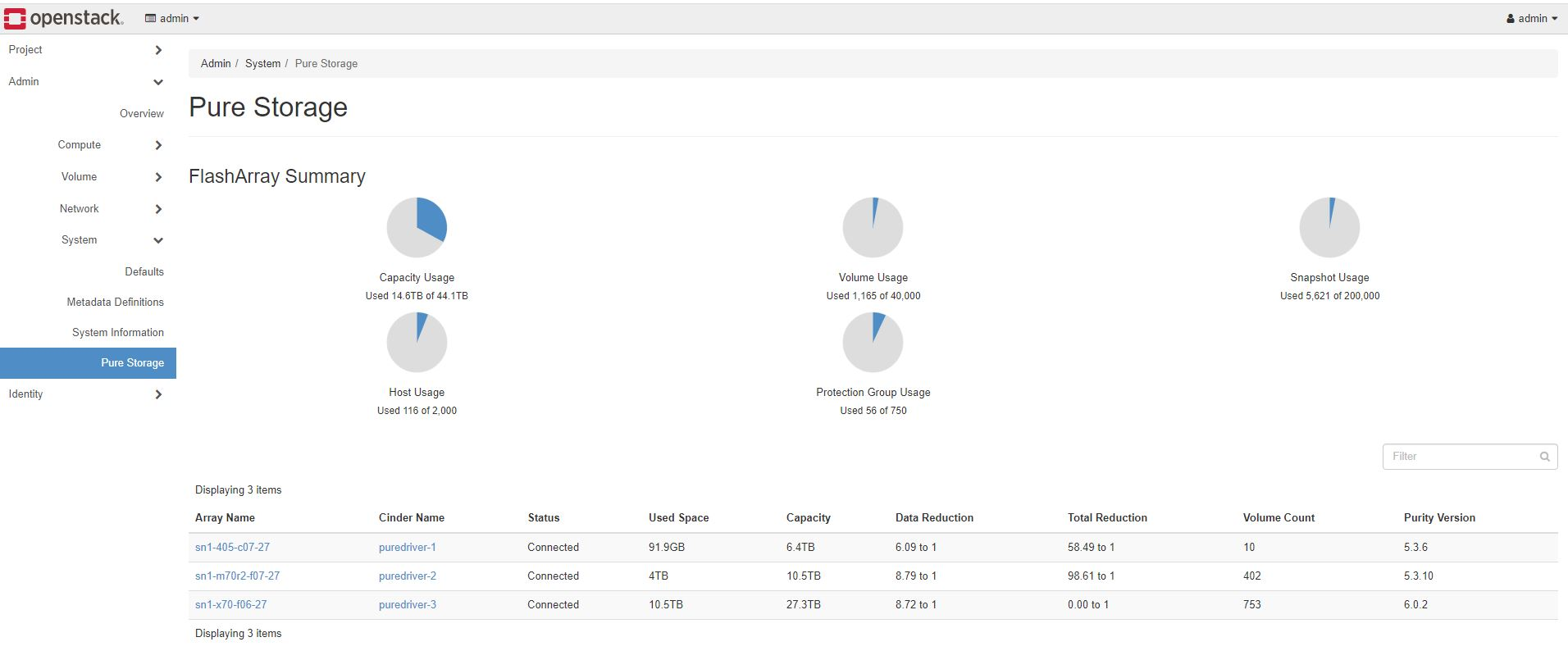
Figure 10.1. FlashArray Summary Dashboard
Selecting the
Array Namewill open a new browser window to the FlashArray Logon GUI.Selecting the
Cinder Namefiled will give a more detailed view of that specific backend array, such as:
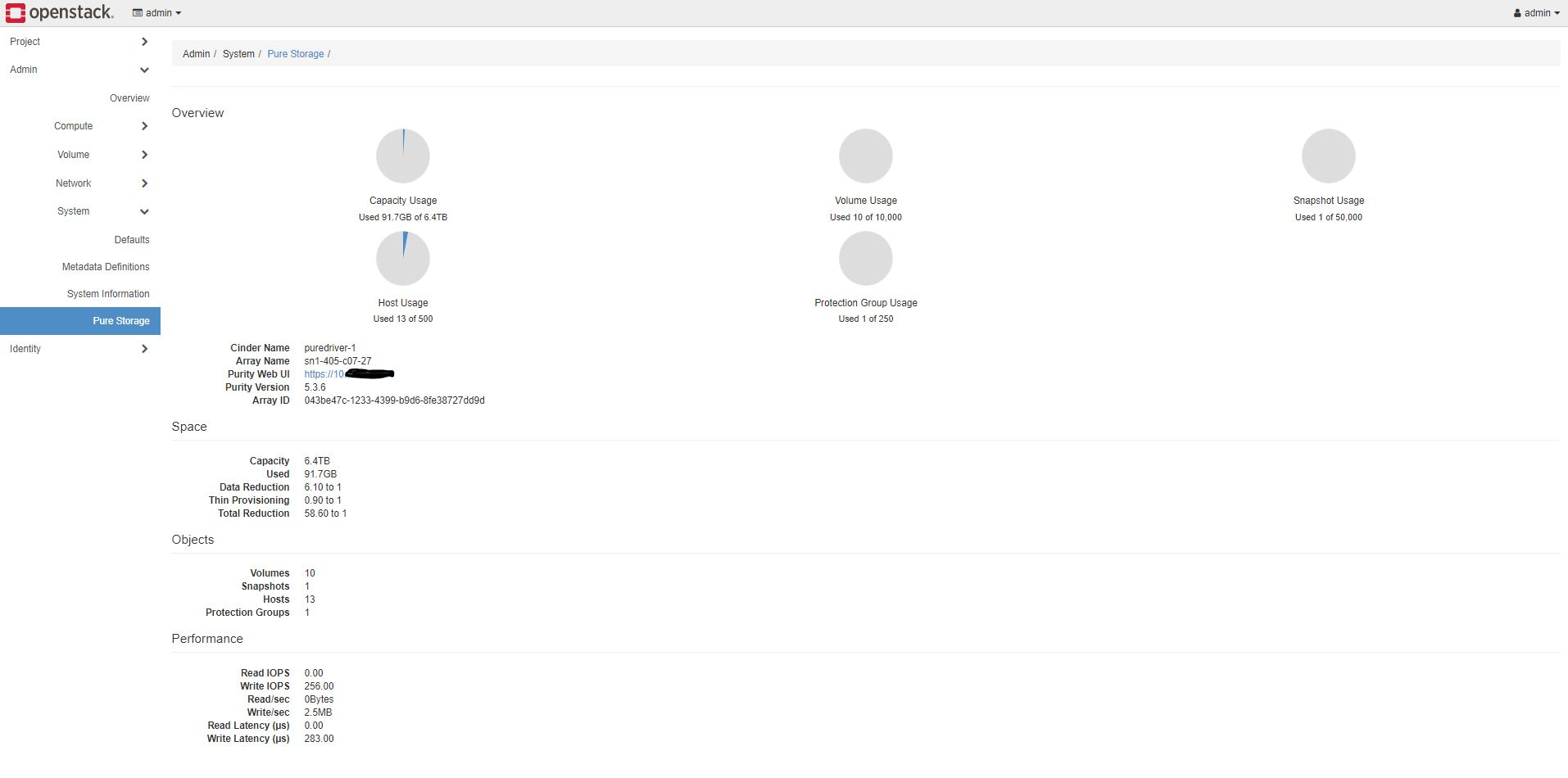
Figure 10.1. FlashArray Detail Dashboard
As a user from the Project level by navigating to Project -> Volumes -> Volumes and then selecting one of the volumes provided by a Pure Storage Cinder driver. This will give an enhanced view of the volume with additional Usage information. An example of this is:
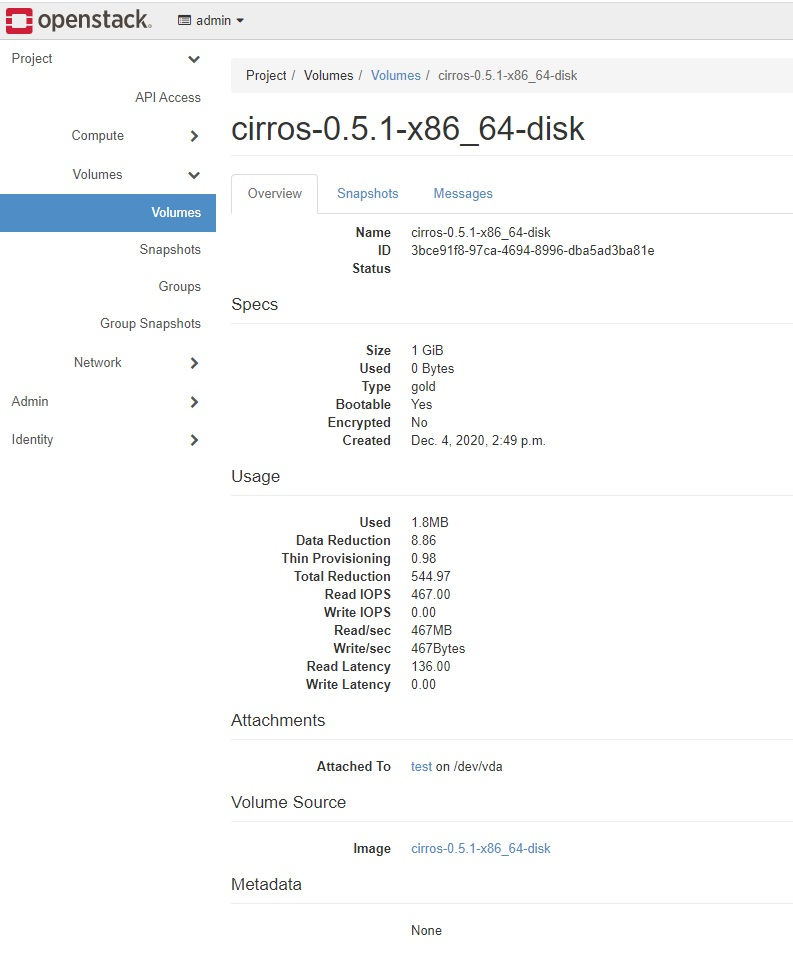
Figure 10.3. Enhanced Volume Dashboard
Uninstalling
To uninstall the Pure Horizon GUI run:
sudo pip uninstall horizon-pure
and delete the enabled and settings files:
rm $HORIZON_DIR/openstack_dashboard/local/enabled/_9999_pure_panel.py
rm $HORIZON_DIR/openstack_dashboard/local/local_settings.d/_9999_pure_settings.py
Compatibility
This has been tested with DevStack on master and Victoria branches. Anything else your mileage may vary.
Warning
This plugin WILL NOT work with OpenStack Stein or earlier versions due to Django versioning changes.
Known Issues
An array running Purity//FA 6.0.x will show Total Reduction as “0.00 to 1” if FA-Files is enabled on the array.
Using the same array in different cinder stanzas will confuse the calculations and the array will be double counted
Support
Please file bugs and issues at the Github issues page. The code and documentation are released with no warranties or SLAs and are intended to be supported through a community driven process.